

Process Optimization
Physics-aware AI for process plants
More good output, steadier quality, less energy.
What Process Optimization does
-
All your operational data in one place
Live and historical data from your PLCs, SCADA, meters and operator entries, turned into your own metrics, with alerts on every phone.
-
An AI process engineer, available 24/7
Root causes ranked with their evidence, and recommendations you accept in one click.
-
Autonomous process control
Proven recommendations applied every minute, through the control system you already run.
Proof
- 2×
- Winner, Autonomous Greenhouse Challenge 2018 and 2022, a live crop each time
- 17%
- Higher net profit than the expert growers 2018 competition, with 6% higher yield
- 19.5%
- Yield increase 29.7 against 24.9 kg/m² in the growers' own zone
- 17%
- Energy savings lower electricity cost per unit, same lights in both zones
The autonomous control in the KoPilot plan has been tested in international competition and in commercial greenhouses. In 2018, the technology behind it was the only AI entry to beat the expert growers on both yield and net profit. It does more than recommend a climate strategy. It makes the control decisions and applies them, day and night.
Process Optimization · Essential
Universal data integration: all your operational data in one place, live and historical
- One data layer for your PLC, SCADA and sensor data, with metrics you define
- Your operational data, modeled as a knowledge graph
- Condition-based alerts and alarms, on every phone
- MCP, so Claude, ChatGPT and your own AI tools can work with your operational data
Data integration
One data layer for everything your plant records
All the data from your PLCs, SCADA, meters and sensors, live and historical, read-only from the systems you already run. Organized around the same equipment and timeline, and turned into the metrics you run the plant by.
- Process and energy data
- Data from your existing PLCs, sensors, meters and control systems, collected at the frequency they already provide it.
- Production batches
- Runs, campaigns, crop cycles or other production periods that connect operational data to what was being produced.
- Your own metrics
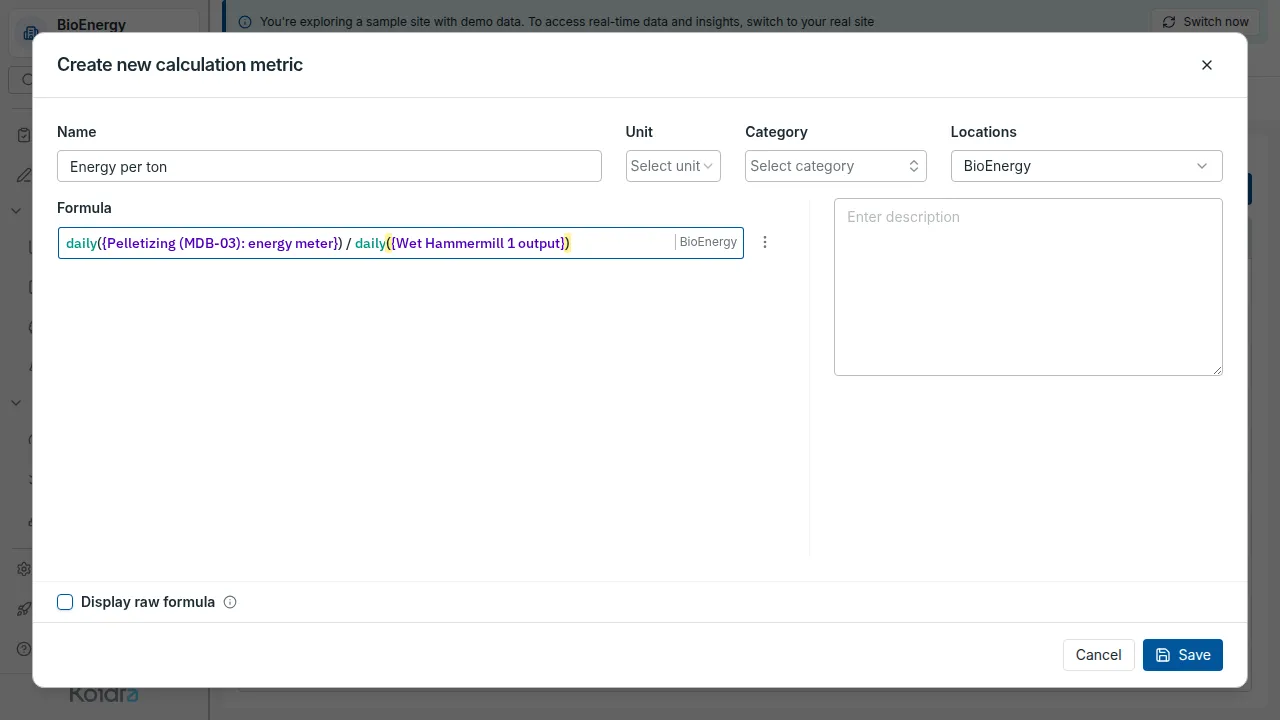
- A formula turns raw readings into the number you manage by, such as energy per tonne. It updates live, and calculated metrics are free.
Semantic operational data
Your plant, modeled as a knowledge graph
Koidra models how your plant is built, and links every number and note to the part of the plant it describes. Sensor data, form entries, photos, alarms and work orders all point to the same areas, machines and production batches, so a question about one machine finds everything that belongs to it.
- Metrics, one model for every time series
- A sensor tag, a setpoint, a number an operator types, a formula you write and each move KoPilot makes are all metrics. One chart, one alarm rule and one analysis work on any of them.
- The plant as it is built
- Sites, areas and lines, the machines in them and their parts, the products you make and each production batch. A metric belongs to an area, a batch, or that batch in that area.
- What people record, in context
- Form entries, photographs, alarm responses and work orders, each tied to the machine and the time they are about.
Alarms and incidents
Alarm rules written like spreadsheet formulas
Most control systems raise an alarm when one reading crosses one limit. That is right for a fast reaction, and it misses problems that build up over hours or involve several readings at once. In Koidra, your team writes a rule as an Excel-style formula on live metrics, such as a spark detector tripping three times in ten minutes, or a burner cooling while its feed screw still runs. A precise rule fires less often by mistake.
- Any metric, any time window
- A rule can combine sensors, formulas and the numbers operators type, and look back over minutes or days.
- Every incident gets an answer
- Each alarm carries its severity and stays open until someone records its cause and how it was resolved. A rule that keeps firing for nothing shows up, and gets fixed instead of ignored.
- From alarm to work order
- When the fix takes longer than a shift, the alarm becomes a work order.
AI tools
MCP is available for interacting with your own AI tools
The Essential plan supports MCP, the Model Context Protocol. With it, general-purpose AI tools such as Claude and ChatGPT can work with your operational data.
Process Optimization · Pro
The AI Consultant: an AI process engineer, available 24/7
Everything in Essential, plus:
- Root cause on request
- Recommendations accepted in one click
- Talk with the agent
- Answers grounded in physics and data
AI Consultant
An AI process engineer, available 24/7
- Root cause on request
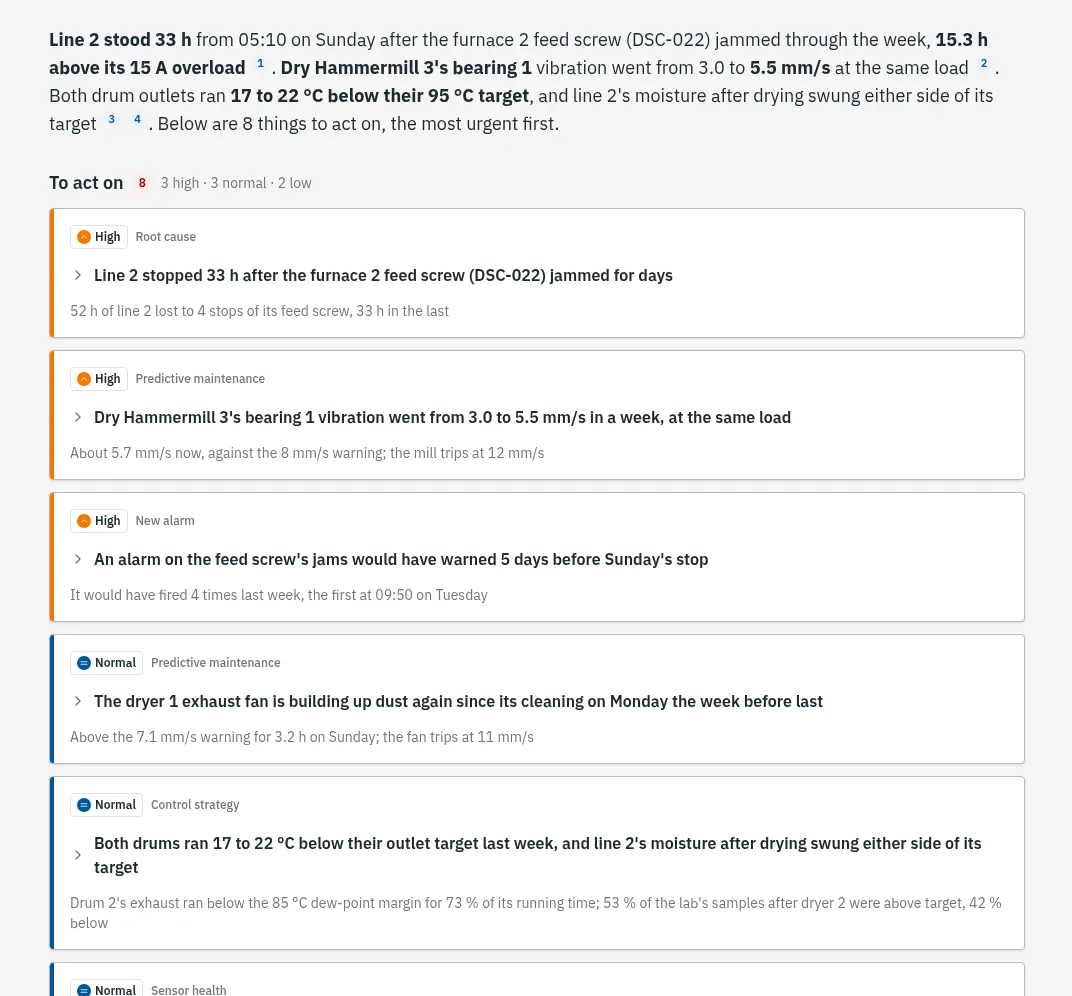
- Ask why a number moved, and get the causes ranked with their evidence.
- Recommendations accepted in one click
- A work order, an alarm change or a new metric.
- Talk with the agent
- Ask about your plant and get answers from its own data, with a Koidra expert behind it.
Physics-informed AI
Answers grounded in physics and data
A language model leads the conversation. Underneath it, Koidra’s physics-informed machine-learning models do the analysis, so every answer rests on the physics of your process and on your own data.
Process Optimization · KoPilot
Autonomous process control: proven recommendations, applied every minute
What your plant gets
- Every shift runs at your best shift's settings
- Steadier quality as raw material changes
- Energy and quality balanced every minute
Everything in Pro, plus:
- It applies proven recommendations through the control system you already run
- Physics-informed decisions that stay within what your equipment can do
- Safety guardrails: limits on settings and conditions, alarms that can switch it off, a switch for every control module
Autonomous control
What KoPilot does
You know what the right setpoints are, and they still depend on who is on shift. KoPilot reads real-time plant data, determines the right setpoints, and sends them back to the control system you already run. It responds continuously as conditions change, so the best night your plant has ever run becomes every night.
- What it replaces
- Setpoints tuned by hand, differently on every shift, and comfort margins nobody has revisited.
- How you measure it
- Energy cost per unit of output, and the output variance between shifts.
Safety
Safety guardrails, built in
Your team sets the limits. KoPilot works inside them.
- Limits on settings and conditions
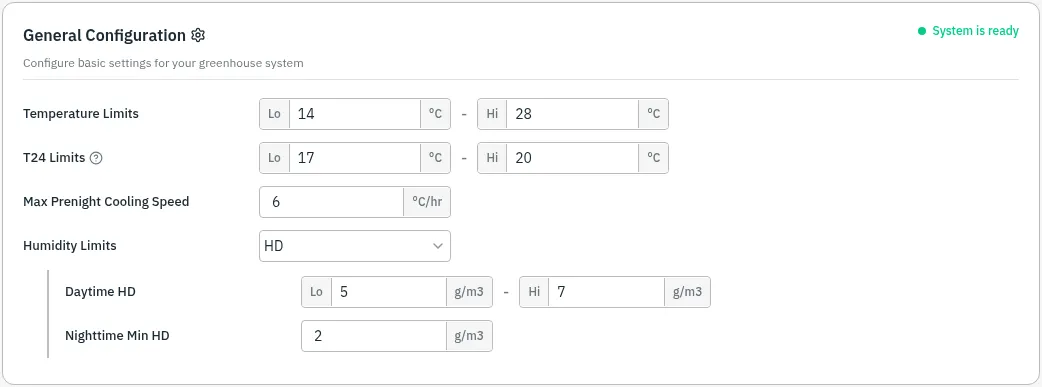
- Engineers set a low and high limit for every setting KoPilot moves, and a safe range for each condition, such as a temperature. When the actual temperature leaves its range, KoPilot moves the settings to bring it back.
- A switch for every control module
- Switch a module off and control goes back to your existing settings at once. Your interlocks stay in charge, and an operator can take back control at any moment.
Safety
An alarm can switch KoPilot off
The condition-based alarms from the Essential plan keep watching the process while KoPilot runs it. When one fires, it can switch KoPilot off on its own. Control goes back to your existing settings, and the alert reaches the person on call.
Control model
Physics-informed control
The control combines process data with models of how the physical system behaves, so a control decision stays within what the equipment can actually do rather than only within patterns seen in historical data.
- How quickly equipment can heat or cool
- A dryer heats only as fast as its mass allows, and the model plans within that.
- How humidity responds to ventilation
- Opening a vent changes humidity and temperature together, and the model knows by how much.
- How one control action affects conditions later
- The model weighs each move over the next four hours, beyond the current minute.
Getting started
How a KoPilot project starts
Every project starts with an assessment of your process.
We look at the quality and coverage of your instrumentation, the reliability of the control system, how well the process can be modeled, and the operating constraints it must respect. A supervised trial comes before autonomous operation.
Most customers start with the Essential plan and add Pro. Those plans build the data, the operating history and the process understanding that make autonomous control reliable.
Tell us about your process, and we will show where autonomous control fits, what comes first, and how a supervised deployment would run.
Two complementary AI-powered solutions
- Process Optimization All your operational data in one place, an AI process engineer available 24/7, and autonomous process control with safety guardrails built in. Essential Universal data integration: all your operational data in one place, live and historical Pro The AI Consultant: an AI process engineer, available 24/7 KoPilot Autonomous process control: proven recommendations, applied every minute
- Intelligent Asset & Maintenance Management Work orders, preventive maintenance, inspection routes and spare parts, on every technician's phone. Essential Modern maintenance management (a CMMS), set up by your own team Pro Predictive maintenance, from evidence to work order
See Koidra on your own plant data
Bring a week of readings from one line. We will show you what the platform sees, what it would have flagged, and what it would have scheduled.